
OVHcloud order validation FAQ
Learn about the OVHcloud order validation process and what to do if your order requires further action.
The order validation process is meant to ensure authorized access, prevent fraudulent activity, and keep our Cloud safe.
NOTE: Any further information we request is intended to confirm the information we have already collected from you in some form. This process helps ensure that we can maximize the resources available to our customers. See section 2(b) of our Terms of Service for more detailed information.
Requirements
- an OVHcloud customer account
- at least one order placed
Instructions
Viewing your order's status
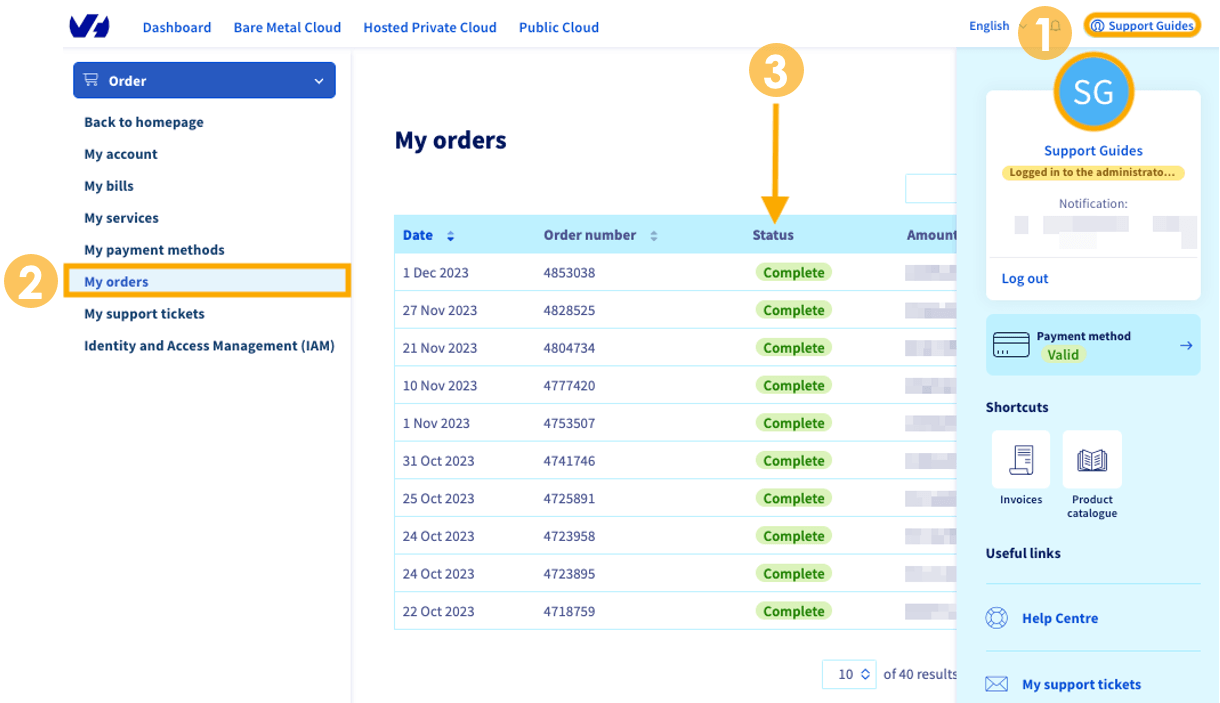
Once you place an order, you can view the status from the OVHcloud Control Panel by:
- Clicking your
namein the upper-right corner and then yourinitialson the right-hand pop-out menu. - Selecting
My orders. - Looking at the Status column.
If your order seems stuck in the Validation status, it means that your order is being reviewed and we will contact you directly if further information is required.
To learn about other order statuses, see this guide.
Handling validation requests
If your order cannot be verified, it will change from a Confirmation status to an Awaiting documents status and an email will be sent to you with details as to why your order cannot be delivered. The subject line of this email will be:
ACTION REQUIRED - Order Pending: [Order xxxxxxxx]
WARNING: Please check the spam folder of the email address used for your OVHcloud Control Panel account.
Below is an example of the email you will receive.
Hello,
Thank you for your recent order (xxxxxxx) with OVHcloud.
To process your order, we need some additional information. This information is used solely for this purpose and is deleted after its use, per our Privacy Policy (https://us.ovhcloud.com/legal/privacy-policy#use).
Please provide full-color photos of the following using the OVHcloudShare app (see instructions below):
- A government-issued photo ID
- A picture of the credit card used in the transaction including:
1. The name matching the listed name in the Manager account, AND
2. The last 4 digits of the card number- A photo of yourself holding the government-issued Photo ID provided above.
Please note that this order can expire if the requested documentation is not received within 48 hours of this request. You may upload the files to the following address: https://files.us.ovhcloud.com.
Please respond to this email to confirm your successful upload of the documents. For additional instruction in using OVHcloudShare, please review our guide: /account/account-information/use-ovhcloudshare. After we review the information you provide, we will validate the transaction and approve delivery/provisioning.
We thank you for your understanding, your cooperation in this matter, and for choosing OVHcloud.
From here, as the email states, you will have to upload your supporting documentation and reply to the validation email.
Replying to the email is the best way to receive updates throughout the validation process and resolve any issues specific to your case.
How we handle your personal information
All personal identifying information we collect from you is immediately destroyed after validation is complete. To read more about your personal data, see our Privacy Policy.
FAQ
How long do I have to submit the requested documents?
You have approximately 48 hours to submit the requested documentation before the order will be canceled.
Will I be charged before validation is complete?
When you submit an order, the amount will be preauthorized on the payment method you provided. If the order validation fails, the preauthorization will be reversed.
Is this required for all of my future orders?
Possibly. We will contact you directly if validation is needed again. There are circumstances other than orders for which validation may be requested.
If I don't want to submit these items, will I receive a refund?
Yes, the preauthorization will be reversed.
What should I do if the card name doesn't match?
We will review your order and contact you if more information is required.
What should I do if I use PayPal or a digital credit card?
We will review your order and contact you if more information is required.
How can I obtain updates on this process?
If you have replied to the initial email sent to you, that email thread is the best way to receive any updates. You can also monitor the status of your order in the OVHcloud Control Panel.
Either way, you will be notified of the result of the validation process
I've uploaded all the documents. Now what?
Confirm that you have uploaded the documents by replying to the initial email.
Go further
Browse all the Managing billing, payments, and services guides.
Browse the rest of the OVHcloud US documentation for guides on our other products and services.