
How to determine if your dedicated server supports virtual MAC addresses
Learn how to check in the OVHcloud API if your dedicated server supports the virtual MAC feature.
In order to use virtual MAC (vMAC) addresses on a dedicated server, you first need to make sure your server supports this feature.
Support for the vMAC function is a prerequisite for all actions concerning virtual MACs.
Requirements
- a dedicated server in your OVHcloud account
- access to the OVHcloud API
If you are not familiar with using the OVHcloud API, please refer to our guide on getting started with the OVHcloud API.
Instructions
Open the following API endpoint in the API console:
Enter the internal server name into the serviceName field, then clic Execute.
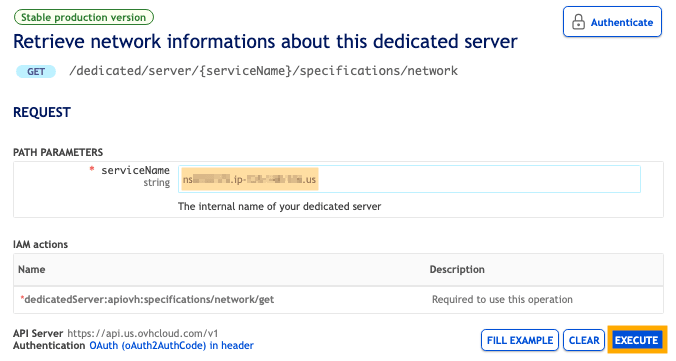
The result will show a "vmac / supported" entry which can be "true" or "false" (boolean value).
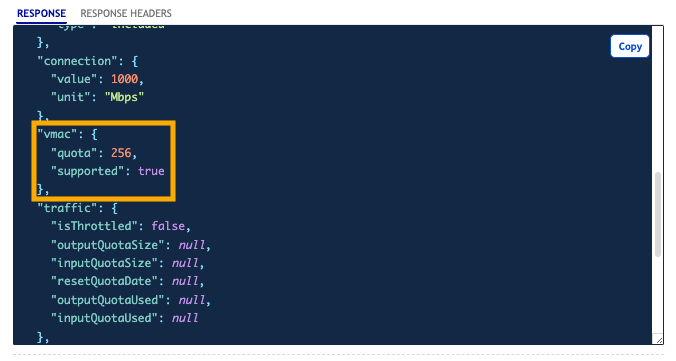
Interpretation of the result
false: You cannot use the virtual MAC feature on this server.
true: You can use the virtual MAC feature on this server.
Go further
Browse all the Dedicated Servers guides.
Browse the rest of the OVHcloud US documentation for guides on our other products and services.
Learn more about Dedicated Servers on the OVHcloud US website.