
Object Storage - Use Object Storage with Rclone
Rclone is a backup tool that can sync to and from various storage backends and can be used on Windows, macOS, and Linux. Detailed documentation is also available on the official Rclone website.
There are two flavors of Object Storage, which you can compare in the table below. You can also click here to view more detailed information about all Object Storage options.
NOTE: OVHcloud provides services for which you are responsible for their configuration and management. You are therefore responsible for their proper functioning.
This tutorial is designed to help you as much as possible with common tasks. If you are having difficulty performing these actions, please contact a specialized service provider. OVHcloud cannot provide you with technical support in this regard.
Requirements
- A container
- A user with the required access rights on the container
- Your Object Storage credentials (access_key and secret_access_key)
- Rclone installed
See our Getting Started with Object Storage guide.
To identify the endpoint for your storage class, please refer to this guide: Endpoints and Object Storage Geoavailability.
Instructions
To configure Rclone, edit or download the Rclone file.
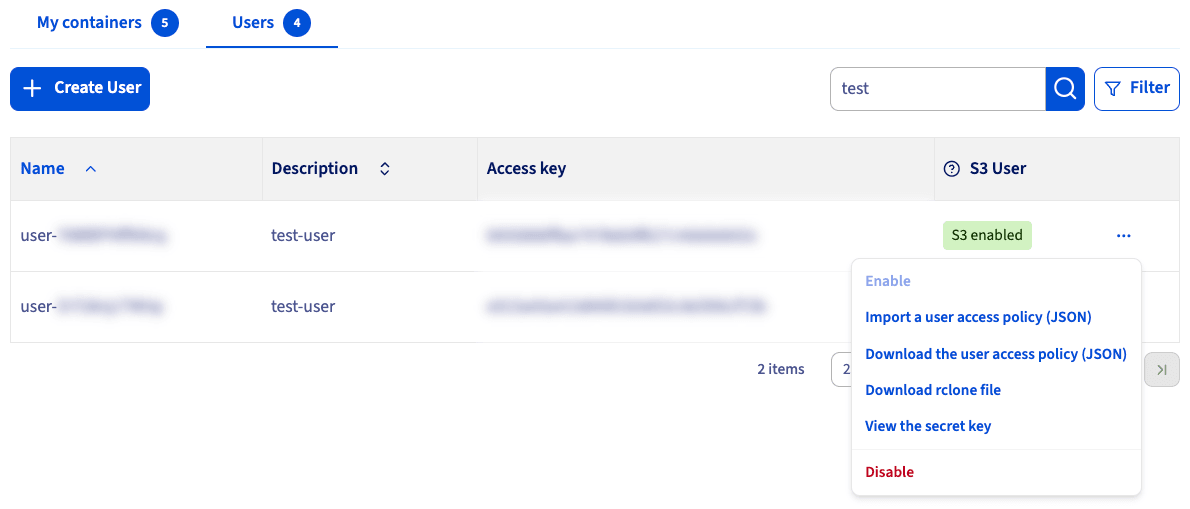
Log in to the OVHcloud Control Panel and navigate to your container via the Public Cloud and Object Storage menus. Then choose the Object Storage users tab,
Click the more options ... button next to the user for whom you wish to download the file and select Download rclone file.
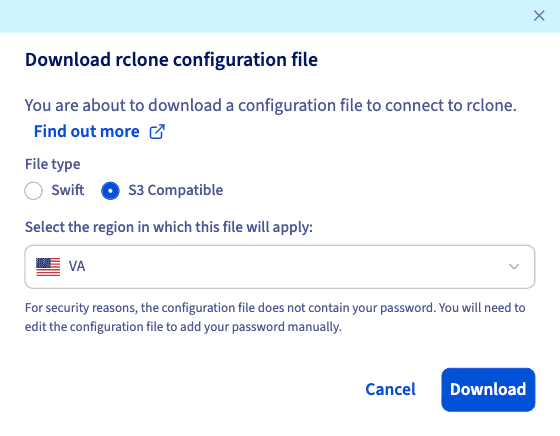
In the pop-up menu, select S3 as the File type and then click Download. This option applies to "Standard Object Storage" and "High Performance Object Storage."
The configuration file should look like this:
NOTE: You may need to manually add the secret_access_key to the file.
Next, copy the downloaded configuration file into the following Rclone configuration directory to make it default:
- On Windows
- On Linux or Mac
Alternatively, specifying the --config=CONFIG_FILE in the rclone command will override the default file. CONFIG_FILE is the location of downloaded config file.
Command examples
NOTE: The default remote name is the first name in brackets in the configuration file.
List all containers:
Create a new container:
List the contents of a container:
Synchronize a local directory to a bucket:
Copy a file into a bucket:
Download a file from a bucket:
You will find on the official Rclone website a detailed documentation of the possible actions: Official Rclone documentation. Here are full lists of Rclone flags and Rclone commands.
Go further
Browse all the Object Storage (S3™-compatible) guides.
Browse the rest of the OVHcloud US documentation for guides on our other products and services.
Learn more about Object Storage on the OVHcloud US website.
*S3 is a trademark filed by Amazon Technologies, Inc. OVHcloud's service is not sponsored by, endorsed by, or otherwise affiliated with Amazon Technologies, Inc.