
Overview of Billing with OVHcloud US
This article explains the key aspects that you need to know when it comes to the length of the billing cycles for Dedicated Servers, Virtual Private Servers (VPS), Public Cloud Services, and other OVHcloud products.
NOTE: OVHcloud US does not offer customers the option to manually renew services. By following the cancellation instructions in this guide, you are deleting your services, which disables automatic renewal and cancels your service.
The billing date (the date an invoice is due) for a Dedicated Server, VPS, or Public Cloud instance billed monthly will eventually sync to the first of every month. However, due to the differences between each product, this sync is accomplished in different ways as detailed below.
Prerequisites
Topics
- Monthly Billing for a Dedicated Server
- 12-Month or 24-Month Billing for a Dedicated Server
- Monthly Billing for a Virtual Private Server
- 12-Month or 24-Month Up-Front Payment for a Virtual Private Server
- Upgrades on a Virtual Private Server
- Billing for Public Cloud Services
- Hourly Billing for Hosted Private Cloud and Managed Baremetal
- Switching from Hourly to Monthly Billing on Public Cloud Services
- Monthly Billing for Hosted Private Cloud and Managed Baremetal
- Billing for Microsoft Licenses with Hosted Private Cloud
Monthly Billing for a Dedicated Server
Monthly billing for a Dedicated Server breaks down as follows:
- A customer purchases a Dedicated Server and is charged the full monthly amount plus a one-time setup fee.
- The Dedicated Server is accessible until the same day of the following month, at which point the Dedicated Server will automatically renew (unless canceled by the customer).
- On this first renewal date, Customer will be charged a prorated amount based on the number of days remaining in the month.
- On the first of the following month (and on the first of every month thereafter), the customer is charged the full monthly amount.
This policy ensures that customers are eventually billed for their Dedicated Servers on the first of every month regardless of when they were purchased.
Below is an example of the billing in action:
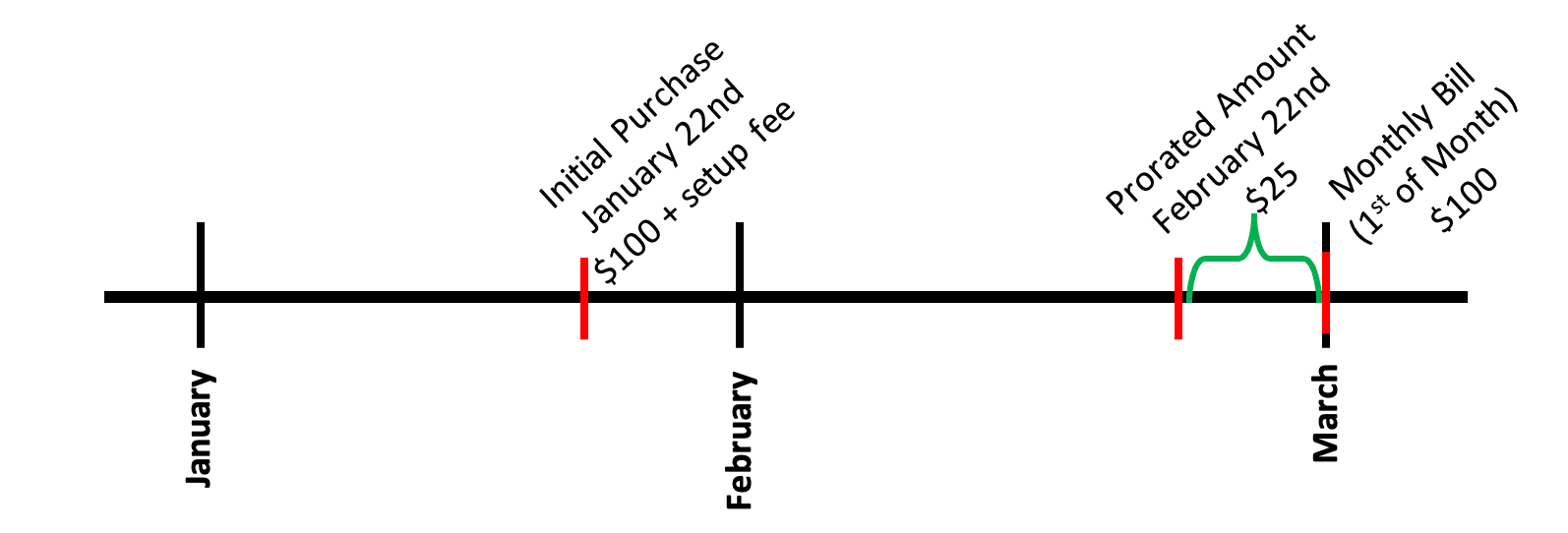
On January 22nd, John Doe purchases a Dedicated Server from OVHcloud for $100 plus a setup fee. This entitles him to access the server until the same day of the following month (i.e., February 22nd). On February 22nd, Mr. Doe is charged $25; a prorated amount that entitles him to access the server until the end of the month (i.e., February). On March 1st, and the first of every month thereafter, Mr. Doe will be charged $100 for the Dedicated Server.
CANCELLATION: Customers who have purchased a Dedicated Server with a one-month commitment period may cancel their Dedicated Server at any time from the OVHcloud Manager. If a cancellation request is not received prior to the first of the month (or the first renewal date, where applicable), the Dedicated Server will automatically renew, and Customer will be charged for the Dedicated Server. To cancel a Dedicated Server, please check out our How to Delete a Dedicated Server article.
12-Month or 24-Month Billing for Dedicated Server
12- or 24-month billing for a Dedicated Server breaks down as follows:
- A customer purchases a Dedicated Server and is charged the full 12- or 24-month amount with the one-time setup fee waived. This purchase date becomes the renewal date.
- The Dedicated Server is accessible until the next renewal date based on the initial commitment period (12 or 24 months later), at which point the customer's Dedicated Server will automatically renew for an equal commitment period.
- On the first renewal date, the customer is charged a prorated amount covering the period from the renewal date until the first of the month containing their next renewal date.
- Going forward, the customer's Dedicated Server will automatically renew on the 1st of the month containing the customer's original renewal date every 12 or 24 months depending on their commitment period.
This policy ensures that our customers are billed for their Dedicated Servers on the first of every month for which they receive an invoice.
Below is an example of 12-month billing:
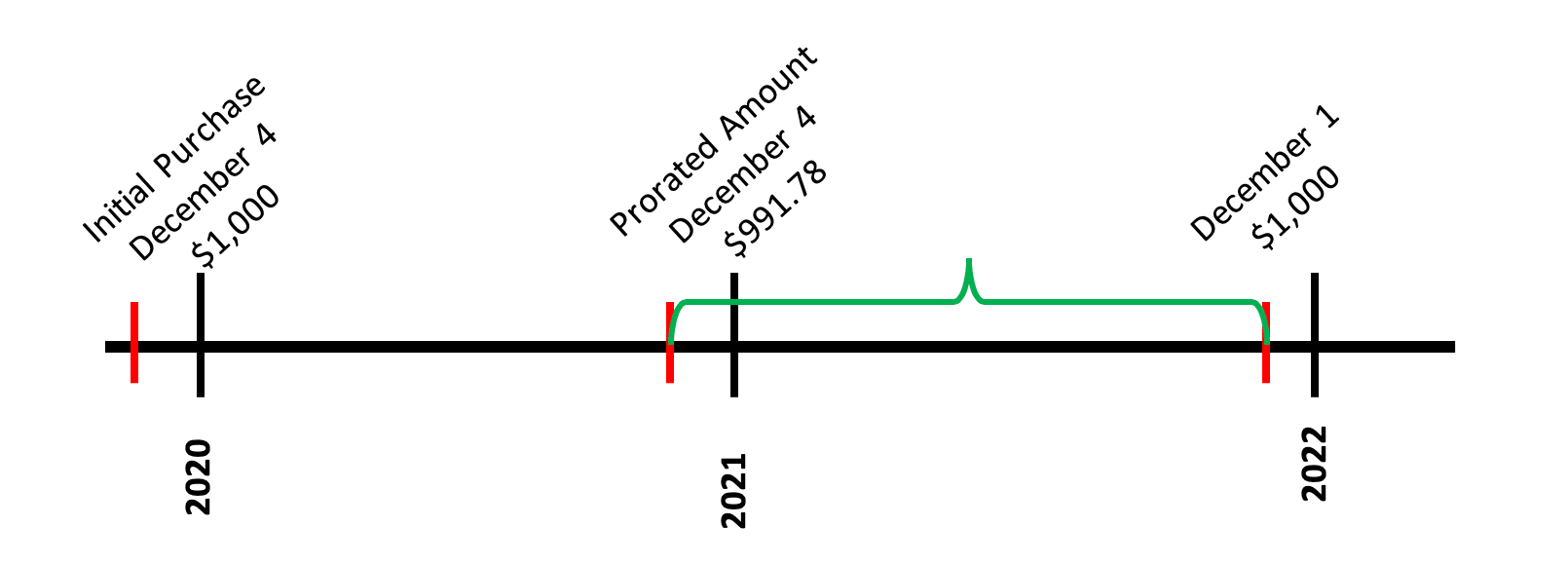
For 24-month billing, this customer would pay the prorated amount on December 4, 2021 instead of December 4, 2020.
On December 4, 2019, John Doe purchases a Dedicated Server for 12 months which costs $1,000 after the applicable discount. This entitles him to use the server until December 4, 2020, when he will be charged a prorated amount to December 1, 2021, the first of the month containing his anniversary date at the end of his 12-month commitment period. (Had John Doe purchased for 24 months, he would be charged a prorated amount on December 4, 2021 which would entitle him to the server until December 1, 2023.) On December 1, 2021, John Doe pays the full $1000 fee once again.
CANCELLATION: If you choose a 12- or 24-month commitment period, you will only be able to cancel your Dedicated Server by paying off the remaining balance you would owe for the full term of the commitment. Please ensure that you choose a commitment period appropriate to how long you wish to keep the service. If you choose a month-to-month commitment period, you can cancel your Dedicated Server at any time from the OVHcloud Manager. To cancel a Dedicated Server, please check out our Canceling a dedicated server article.
Monthly Billing for a Virtual Private Server
You can choose to be billed monthly for a Virtual Private Server (VPS) regardless of whether you select a commitment that is month-to-month, 12 months, or 24 months. Selecting a 12- or 24-month commitment will allow you to pay monthly at a discounted rate. Monthly billing breaks down as follows:
- A customer purchases a VPS and is charged the full monthly amount.
- If a one-month commitment is selected, the VPS is accessible until the same day of the following month, at which point the VPS will automatically renew. If a longer commitment is selected, the VPS will automatically be billed on this date.
- On that date, the customer is charged a prorated amount so that the VPS is accessible until the end of that month.
- On the first of the following month (and the first of every month thereafter), the customer is charged the full amount.
This method ensures that a customer is eventually billed for their VPS on the first of every month regardless of when it was purchased.
Below is an example of the billing in action:
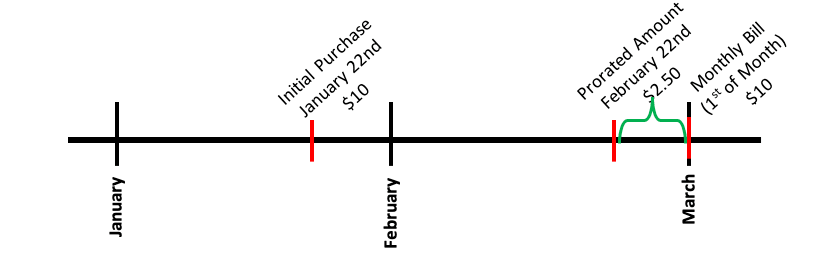
On January 22nd, John Doe purchases a VPS from OVHcloud for $10. This entitles him to access the VPS until the same date of the following month (i.e., February 22nd). On February 22nd, Mr. Doe is charged $2.50, a prorated amount that entitles him to access the server until the end of the month (i.e., February). On March 1st, and the first of every month thereafter, Mr. Doe will be charged $10 for the VPS.
CANCELLATION: If you choose a 12- or 24-month commitment period, you will only be able to cancel your VPS by paying off the remaining balance you would owe for the full term of the commitment. Please ensure that you choose a commitment period appropriate to how long you wish to keep the service. If you choose a month-to-month commitment period, you can cancel your VPS at any time from the OVHcloud Manager. To cancel a VPS, please check out our Canceling your VPS article.
12-Month or 24-Month Up-Front Payment for Virtual Private Server
If you choose to go with a 12- or 24-month commitment for a Virtual Private Server (VPS), OVHcloud will give you the option to pay the entire cost for the commitment upfront and receive an additional discount. If you choose to pay upfront, your billing will break down as follows:
- A customer purchases a VPS and is charged the full amount owed for the 12- or 24-month commitment. This purchase date becomes the renewal date.
- The VPS is accessible until the next renewal date based on the initial commitment period (12 or 24 months later), at which point, the customer's VPS will automatically renew for an equal commitment period (unless canceled by the customer). Cancellation can happen at any time, but the customer will lose access once the cancellation is submitted.
- On that renewal date, the customer is charged a prorated amount so that the VPS is accessible up until the 1st of the month containing their next renewal date.
- From now on, the customer will use the 1st of the month containing their original renewal date as their renewal date from now on and will automatically renew on this date every 12 or 24 months depending on their commitment.
This policy ensures that a customer is eventually billed for their VPS on the first of every month in which they receive an invoice.
Below is an example of 12-month billing:
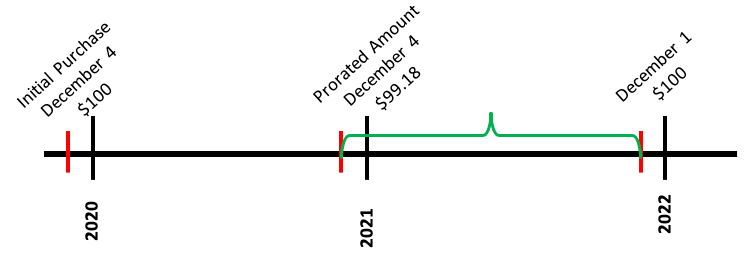
For 24 month billing, this customer would pay the prorated amount on December 4, 2021 instead of December 4, 2020.
On December 4, 2019, John Doe purchases a VPS for 12 months which costs $100 after the applicable discount. This entitles him to use the server until December 4, 2020, when he will be charged a prorated amount to December 1, 2021, the first of the month containing his renewal date at the end of his 12-month commitment period. (Had John Doe purchased for 24 months, he would be charged a prorated amount on December 4, 2021 which would entitle him to the VPS until December 1, 2023.) On December 1, 2021, John Doe pays the full $100 fee once again.
Upgrades on a Virtual Private Server
If you purchase an upgrade to your Virtual Private Server (VPS), the amount billed will be prorated to the end of your current commitment period and paid as follows:
- If a customer pays monthly (regardless of whether they have selected a 12- or 24-month commitment), the charge will be added to the customer's monthly bill with the first month prorated per the above Monthly Billing for a Virtual Private Server section.
- If a customer pays over 12- or 24-month periods, the customer will be charged a prorated amount covering the period from the purchase date until their next renewal date upfront as a one-time fee. The applicable discounts will still apply.
Public Cloud
The billing for OVHcloud Public Cloud services is, in some ways, very different from other OVHcloud services. Read our Public Cloud Billing guide for detailed information. The list below provides some helpful guides to start, manage, or cancel your Public Cloud services.
NOTE: As of April 1, 2026, Public Cloud services are invoiced separately from Bare Metal or Hosted Private Cloud services.
Creation
Management
Cancellation
Knowledge Bases
Hourly Billing for Hosted Private Cloud and Managed Bare Metal
WARNING: If you shut down a service, you will still be billed hourly for it. To stop hourly billing on a service, the service must be canceled from the OVHcloud Manager.
When it comes to hourly billing, the thing to remember is that the charges are collected at the end of the billing period instead of the beginning.
Below is an example of the billing in action:
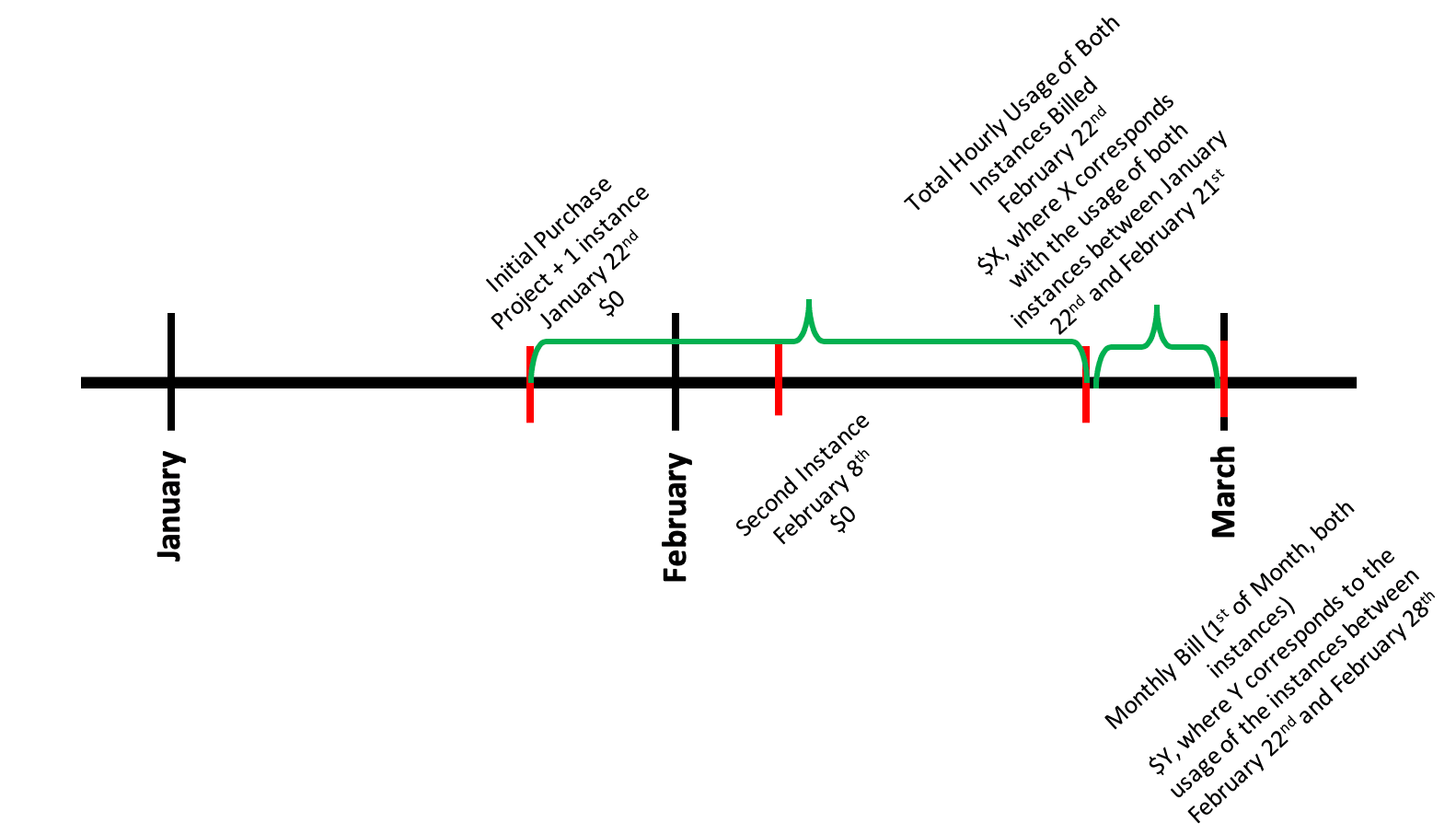
On January 22nd, Jane Smith creates a service with hourly billing and therefore no charges are billed. This entitles her to access the instances until the same date of the following month (i.e., February 22nd). Additionally, on February 8th, Ms. Smith creates a second instance with hourly billing and therefore no charges are billed. On February 22nd, Ms. Smith will be billed for the usage of both instances (the one created on January 22nd and the other one created on February 8th). Then, she will be billed for the usage from February 22nd to February 28th on March 1st. Assuming that Ms. Smith does not create any other instances, going forward she will be charged on the 1st of every month for the total resource usage for both instances.
NOTE: If the service you have purchased is Hosted Private Cloud or Managed Baremetal, you will see an additional charge for a management fee. This fee covers the cost of OVHcloud managing vCenter in addition to your infrastructure.
Monthly Billing for Hosted Private Cloud and Managed Baremetal
NOTE: On your bill, you will see a management fee reflected in the total. This is to cover the costs of maintaining the vCenter infrastructure that OVHcloud manages for you.
Billing for Hosted Private Cloud (HPC) works exactly like a Dedicated Server if you choose month-to-month billing. If we look at the below example, we can get a visual of how month-to-month billing would function.
- A customer purchases an HPC environment and is charged the full amount.
- The environment is accessible until the same date of the following month.
- On that date, the customer is charged a prorated amount so that the environment is accessible to the end of that month.
- On the first of the following month (and the first of every month thereafter), the customer is charged the full amount up-front.
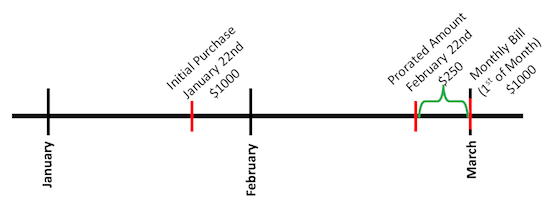
On January 22nd, John Doe purchases an HPC environment from OVHcloud for $1,000. This entitles him to access the HPC environment until the same date of the following month (i.e., February 22nd). On February 22nd, Mr. Doe is charged $250; a prorated amount that entitles him to access the resource until the end of the month (i.e., February). On March 1st, and the first of every month thereafter, Mr. Doe will be charged $1,000 for the HPC environment.
With HPC, you also have the option of prepaying with a month-to-month, 12-, 24-, or 36-month contract.
NOTE: Haven't received an invoice? Have more specific questions about HPC billing? Email our billing department at ar@priv.ovh.us.
Billing for Microsoft Licenses with Hosted Private Cloud
WARNING: All specific price points in this section are example pricing. The formulas used to calculate your total are applicable but the specific numbers may vary. If you need specific pricing information, please contact your account manager or customer support.
Windows Server
Windows Server OS licensing is priced based on the total number of physical cores of a host with a minimum purchase of 8 cores per physical CPU. They are sold in 2-pack SKUs.
Because of this, the price for a single Windows Server VM running on a host would be charged as per the below formula:
(Total Physical Cores(Minimum 8) / 2) x $6.00(Current 2 core Windows Server Standard SKU price) = Price Per VM (up to 6 total VMs)
Once the Windows VM count is >= 7 VMs for a specific ESXi host, the license will be automatically converted to a Windows Datacenter license which allows unlimited VMs for that host. The calculation for this pricing is reflected in the following formula:
(Total Physical Cores(Minimum 8) / 2) x $38.00(Current 2 core Windows Server Datacenter SKU price) = Total for all VMs on ESXi host
Let's take a look at some in-depth examples of how this would work.
Example 1:
John Doe purchases Windows Server 2019 Standard Edition and puts it on his DC-M host which contains six physical cores. He puts this license on six VMs. If the Windows Standard license costs $6.00 per every two cores, how much will John be charged per month for the license?
Answer:
- Host Cores(6 physical cores but minimum charge for 8) / 2 = 4
- 4 x $6.00 per core pair = $24.00
- $24.00 x 6 VMs = $144.00
John Doe will be charged $144.00 for his Windows Server 2019 Standard license per month or $24.00 per VM.
Example 2:
Jane Doe purchases Windows Server 2019 Standard Edition and puts it on her DC-M host which contains 6 physical cores. She puts her license on 8 VMs. Because this is more than 6 Windows Server VMs, her license automatically changes to Windows Server 2019 Datacenter Edition. How much will Ms. Doe be charged per month for the license?
- Host Cores(6 physical cores but minimum charge for 8) / 2 = 4
- 4 x $38.00 = $152.00
Jane Doe will be charged $152.00 per month for all of the VMs on her host.
SQL Server
Windows SQL Server licensing is priced based on the total number of vCPUs of the VM, which is running on a licensed Windows OS license. The charge will be for a minimum of 4 vCPUs. They are sold in a 2-pack SKU for up to a maximum of 16 vCPUs. Thus, SQL pricing can be calculated according to the following formula.
(Total vCPU of VM(Minimum 4 and Maximum 16) / 2) x (Current 2 core SKU price) = Price per SQL VM
Example:
Jane Doe purchases Windows SQL Server Standard for a VM containing 8 vCPUs. She puts this license on three VMs. If the Windows SQL Standard license costs $200 per every two cores, how much will Jane be charged per month for the license?
Answer:
- vCPUs(8) / 2 = 4
- 4 x $200 per vCPU = $800.00
- $800 x Max Number of VMs Charged(3) = $2,400.00
Jane Doe will be charged $2,400.00 for her Windows SQL Server Standard license every month. Because Windows SQL Server Standard edition has no limit for how many VMs are charged, Jane is charged for every VM.
Conclusion
Having read this article, you should be able to understand your billing cycle and anticipate your payments. If you have any further questions or concerns, don't hesitate to reach out to OVHcloud Support. An agent will be waiting to answer all of your questions.