
Object Storage - Getting started with versioning
Learn how to enable and manage versioning for your OVHcloud Object Storage buckets using APIs.
Some actions are available only through the OVHcloud API or through the OVHcloud Control Panel.
Requirements
- A Public Cloud project in your OVHcloud account
- An Object Storage user already created
- AWS CLI installed and configured
OVHcloud Control Panel Access
- Direct link: Public Cloud Projects
- Navigation path:
Public Cloud> Select your project
Instructions
Concept
Versioning lets you keep multiple variants of an object in the same bucket. This feature helps preserve, retrieve, and restore every version of every object stored in your buckets, making it easier to recover from unintended user actions or application failures. By default, versioning is disabled on buckets, and you must explicitly enable it.
General information
An Object Storage bucket can be in one of three states:
- Unversioned (default state): No versions are kept for the objects.
- Versioning-enabled: Multiple versions of each object are kept.
- Versioning-suspended: Versions are not created for new objects, but existing versions are retained.
NOTE: Once versioning is enabled, it cannot be disabled and can only be suspended.

Enabling and suspending versioning is done at the bucket level. Once enabled, all objects in the bucket will receive a unique version ID. Existing objects will have a version ID of null until they are modified.
How versioning works
Versioning adds a layer of protection to your data by keeping multiple versions of an object in the same bucket. When you enable versioning for a bucket, every object in the bucket gets a unique version ID. This means that every time an object is modified or deleted, a new version is created, and the old version is retained. This allows you to recover previous versions of an object if necessary.
- Uploading new objects: A unique version ID is assigned to each object.
- Modifying objects: A new version ID is generated, and the previous version is retained.
- Deleting objects: The deletion operation creates a delete marker but does not remove the previous versions. The object can be restored by removing the delete marker.
Version IDs
Each object has a unique version ID, whether or not versioning is enabled. In a versioning-enabled bucket, this version ID distinguishes one version from other versions of the same object.
- Current version: The most recently created version of an object (with the most recent
LastModifiedDatemetadata value). - Noncurrent versions: Versions previously created (with their own unique version IDs).
When versioning is not enabled:
- There are no noncurrent versions as OVHcloud Object Storage will always overwrite the current version with the latest created version when you PUT the same object (i.e., with the same key).
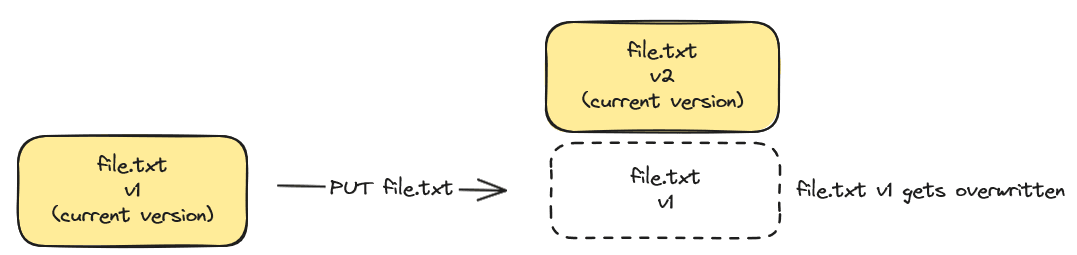
- If you delete an object, it will be permanently deleted as only one version of your object exists at any given time.

With versioning enabled
When versioning is enabled:
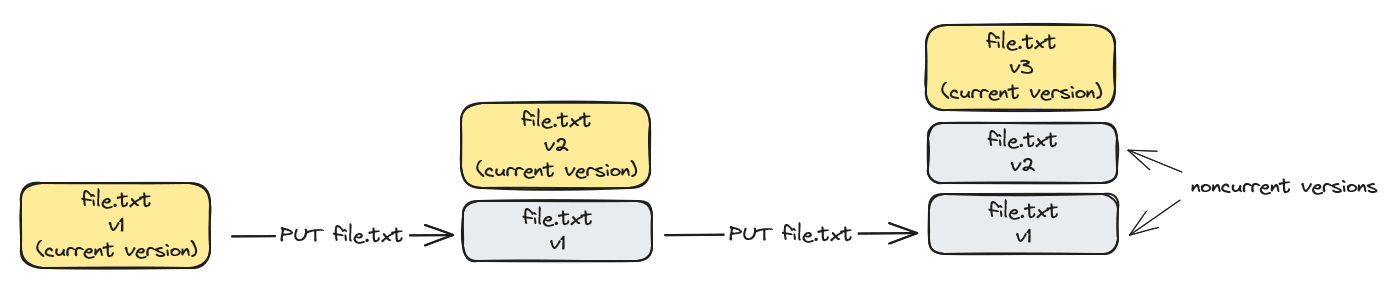
- Each time you upload the same object, a noncurrent version of the object is created, and the latest created version becomes the current version. Old versions are kept and data is protected from accidental deletions or application failures. You can retrieve them anytime.
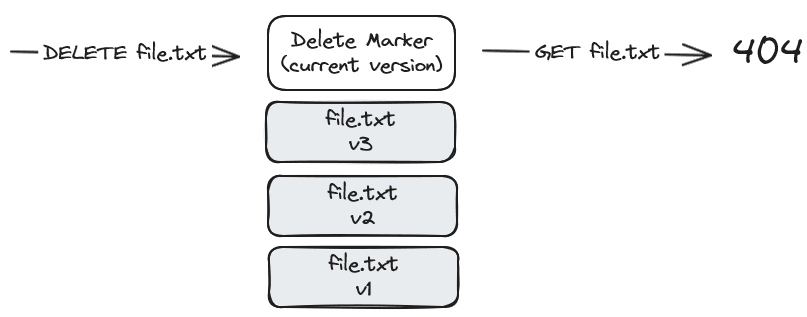
- If you delete an object, by default, OVHcloud will create a Delete Marker (DM) as the new current version, and all previous versions remain. The object is thus considered "deleted," and a GET object operation on that object will return a 404 error.
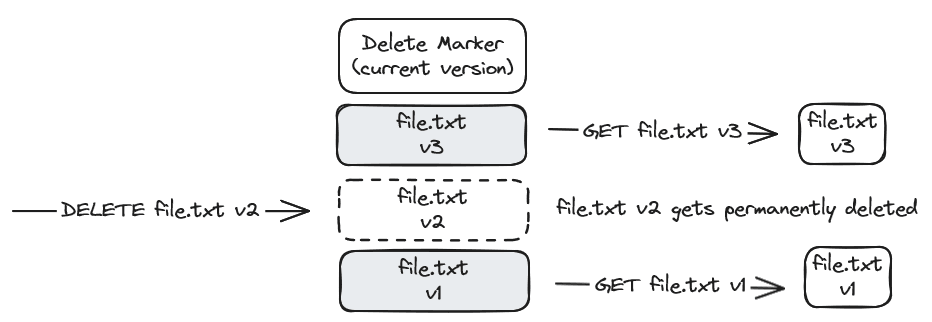
- You can still download or delete a specific version of an object by specifying a version ID. Deleting an object by specifying a version number is irreversible.
How to enable versioning
Via AWS CLI
To enable versioning on an Object Storage bucket, use the following command:
Explanation:
put-bucket-versioning: AWS CLI command to configure versioning.--bucket my-bucket: Replacemy-bucketwith the name of your bucket.--versioning-configuration Status=Enabled: Enables versioning for the specified bucket.
After enabling versioning, all objects added to the bucket will have a unique version ID. This means that every time an object is modified or deleted, a new version is created, which can be restored if needed.
How to suspend versioning
Via AWS CLI
To suspend versioning, set the versioning configuration status to Suspended:
Explanation:
put-bucket-versioning: AWS CLI command to configure versioning.--bucket my-bucket: Replacemy-bucketwith the name of your bucket.--versioning-configuration Status=Suspended: Suspends versioning for the specified bucket.
Suspending versioning stops new objects from receiving a version ID. Existing objects and their versions remain unchanged, but new objects will not have version IDs until versioning is re-enabled.
Manage and access object versions
View object versions
Via the OVHcloud Control Panel
You can display or hide object versions in the Object Storage bucket by clicking the See versions button in the Objects tab.
View different versions of an object
Via the OVHcloud Control Panel
To view the different versions of an object, click the Objects tab. You'll be redirected to a page showing its details. To see the available versions, click the Versions tab.
Download a current or preview version of an object
Via the OVHcloud Control Panel
From the main page of your Object Storage bucket (if version display is enabled) or from the Versions tab on the object details page (see previous step), you can download the desired version by clicking the more options ... button, then Download.
Object deletion and Delete Marker management
If versioning is enabled on your Object Storage bucket, deleting an object adds a Delete marker; the object disappears from the default view, but remains visible via the See versions option.
This protection allows you to restore an object deleted by mistake.
Via AWS CLI
To delete an object, use the following command:
If you want to see the different versions of an object, use the following command:
To delete a specific version of an object:
To delete a delete marker to recover your object version:
-
List delete markers and identify the version ID of the delete marker:
-
Delete this delete marker:
Important considerations
- Storage Costs: Each version of an object is stored as a full object, incurring Standard Object Storage costs.
- Application: When versioning is enabled, it applies to all objects in the bucket, including those added before versioning was enabled.
- Suspension: Suspending versioning does not delete existing versions, it only stops new versions from being created.
- Permissions: Only the bucket owner can enable or suspend versioning.
Go further
Browse all the Object Storage (S3™-compatible) guides.
Browse the rest of the OVHcloud US documentation for guides on our other products and services.
Learn more about Object Storage on the OVHcloud US website.
*S3 is a trademark filed by Amazon Technologies, Inc. OVHcloud's service is not sponsored by, endorsed by, or otherwise affiliated with Amazon Technologies, Inc.