
How to install VMware ESXi 8 on a dedicated server
Learn how to install ESXi 8 on your dedicated servers, and select a partitioning layout in the OVHcloud Control Panel or via the OVHcloud API.
Since September 15, 2025, OVHcloud has provided an ESXi 8 installation template for its dedicated servers.
Requirements
- A dedicated server ready to be installed/reinstalled in your OVHcloud account that is compatible with ESXi 8 hardware requirements
- Access to the OVHcloud Control Panel and/or the OVHcloud API
WARNING: Reinstalling a dedicated server deletes all data currently stored on it.
Instructions
With OVHcloud dedicated servers, you can freely configure partitioning. This gives customers a wide range of options when installing an operating system. ESXi is an exception because it is a UNIX-based, proprietary system with a proprietary installer.
OVHcloud installations of ESXi are, therefore, compliant with the configuration set by the software publisher.
ESXi 7.0 and later versions introduced a boot option to configure the size of ESXi system partitions because the increased size of the system partition could cause issues, especially on systems with small disks. OVHcloud includes this feature in the OVHcloud Control Panel and the OVHcloud API.
Even with multiple disks available on a server, the ESXi OS installation uses only the first disk of the targeted disk group (see OVHcloud API and Storage). Other disks may be configured later to be used for virtual machines.
There are four predefined partitioning layouts:
¹ On the first disk of the targeted disk group for the OS installation.
² Space on the disk on which the OS will be installed.
³ A datastore is a disk partition (sometimes also called "container") that ESXi will use to store the virtual machines. More details.
⁴ Customers can still add a datastore afterward on the other disks.
As you can see, no datastore is created on the first disk with the max partitioning layout.
Did you know? VMware on OVHcloud solutions is based on ESXi with the partitioning layout small.
How to select the partitioning scheme
The default partitioning scheme will be used unless another one is selected.
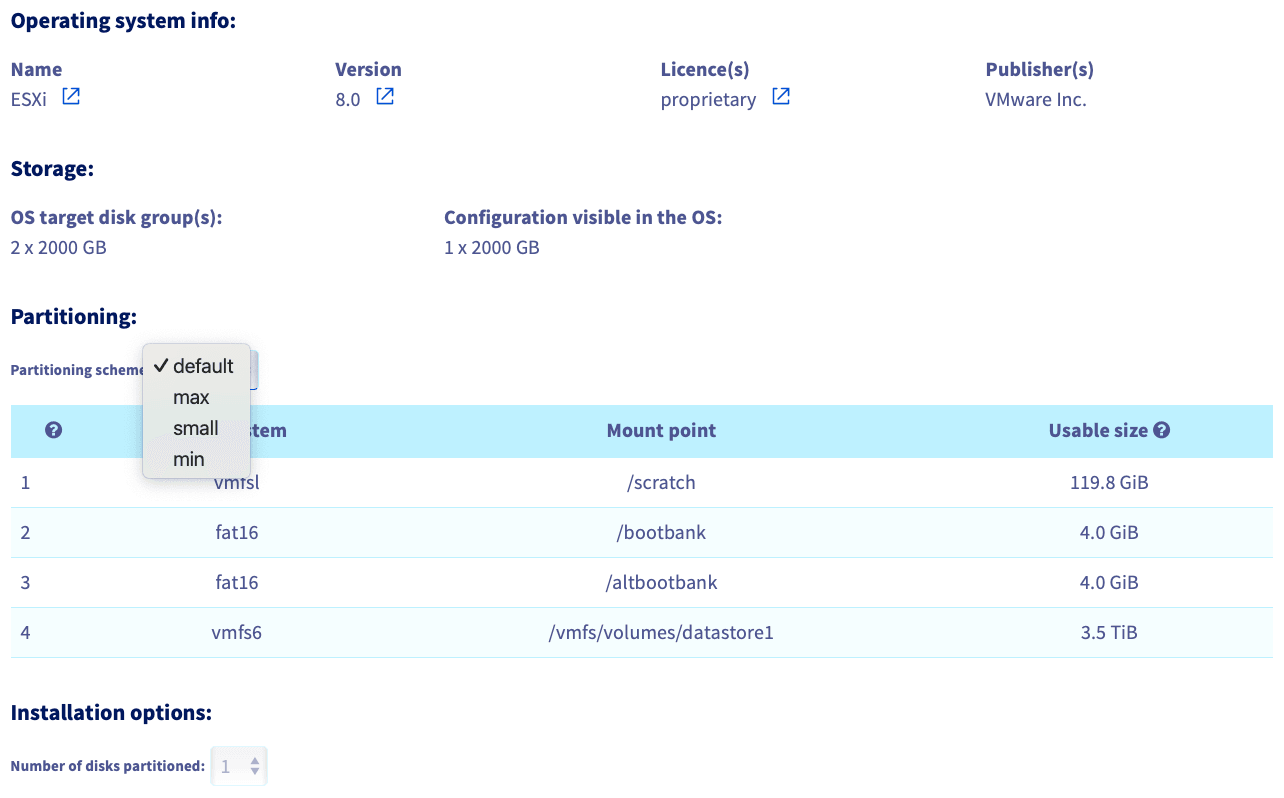
The procedure is very similar to other operating systems, with the exception that you cannot tick the checkbox Customise the partitioning configuration and that you have a dropdown menu to choose the partitioning layout at the fourth and final step.
From the OVHcloud Control Panel, navigate to your server via the Bare Metal Cloud and Dedicated servers menus.
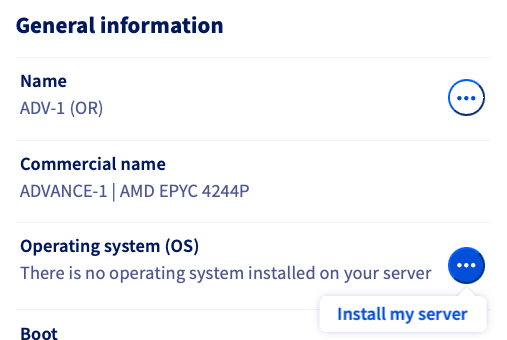
In the General Information panel, click the more options ... button next to the operating system and choose Install my server.
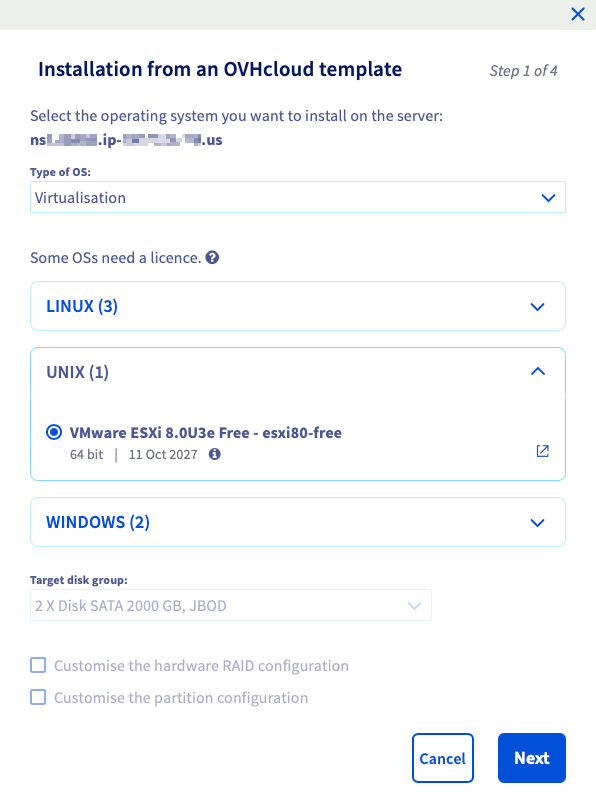
In the popup window, choose Virtualisation, UNIX, and select the ESXi template to install on your dedicated server.
The Customise the hardware RAID configuration and Customise the partition configuration options are only available if your dedicated server has a hardware RAID controller.
Choose the disk group on which you want ESXi to be installed. Note that only the first disk of this group will be used to install the OS. Find more information in this guide.
Click Next to continue.
In the Partitioning scheme dropdown menu, select the desired partitioning scheme. The overview is updated as soon as you select another partitioning scheme, so you can get an idea of how the partitioning will look on your dedicated server.
Fill in the other details and click Confirm to start the ESXi installation on your dedicated server.
The Number of disks partitioned field is grayed out and set to 1, even if your server has more than 1 disk on the target disks group for OS installation, as explained above.
Go further
Boot option to configure the size of ESXI system partitions
Getting Started with a Dedicated Server
Getting started with a Kimsufi, So You Start, or Rise dedicated server
OVHcloud API and OS Installation
Browse all the Dedicated Servers guides.
Browse the rest of the OVHcloud US documentation for guides on our other products and services.
Learn more about Dedicated Servers on the OVHcloud US website.