
End of life for personal installation templates
This is an important documentation; please read it carefully, as you might be impacted in the future if you request an OS installation on a new dedicated server or an OS reinstallation on a dedicated server you already have.
Although this page outlines the decommissioning of personal templates for dedicated server OS installation and its impacts, customers can rest assured that there will be no loss of features.
After this decommissioning, customers will still be able to install operating systems with the same level of customization as before. Moreover, customers who use the API directly will benefit from one simplified API call.
Objective
This page provides key information about the decommissioning plan for personal templates used in dedicated server OS installations. Additionally, it offers helpful tips for customers using the OVHcloud Control Panels. Furthermore, it highlights the benefits of the new API call compared to the deprecated API call.
Context
OVHcloud is constantly evolving and must adapt its offers to the increasingly resilient and regulated cloud market. To meet those new challenges, personal templates for dedicated servers OS installations will be fully decommissioned on the 7th of October 2025.
This feature allowed requesting an OS installation on a dedicated server by using a personal template containing the following elements:
- Operating system to be installed
- Partitioning layout
- Hardware RAID configuration
- Hostname
- SSH public key
- Post-installation script
To simplify the OS installation on dedicated servers as well as the migration communication, a new API call was created:
This API call is the successor of the old route: POST /dedicated/server/{serviceName}/install/start.
The old route could target an OS installation from an OVHcloud template or a personal template.
The old route and the notion of personal templates will be decommissioned. The new route only supports starting an OS installation from an OVHcloud template. Also, please note that the term "OVHcloud template" will gradually disappear in favor of the more precise "operating system".
Personal templates decommissioning will be done in two steps.
Step 1: 17th of June 2025
- Customers will no longer be able to edit or add new personal templates.
- Customers having personal templates and active subscriptions to dedicated servers will receive custom technical information by email to help them migrate their personal templates to the new "/reinstall" API call.
Step 2: 7th of October 2025
- Customers will no longer be able to access their personal templates.
- All data related to personal templates will be deleted.
NOTE: Please note that customers will still have the email from the 17th of June 2025 with technical documentation based on their personal templates data to help them migrate to the new API call.
Instructions
The following section contains specific information for all customers with an account at OVHcloud, SoYouStart or Kimsufi servers, and using either the OVHcloud Control Panel or the API to install OSs on dedicated servers.
Using the OVHcloud Control Panel
The Install one of your templates wizard to install an operating system on a dedicated server has been removed since mid-April 2025. If you were using that wizard, you have three long-term possibilities:
- Keep using the Web interface (not recommended if you plan on automating your OS installations): Apply all customizations in the OS install wizard manually (former
Install from an OVHcloud templatewizard) every time you need to perform an installation. - Write a script that uses the API (best for automation, but requires programming skills): See the Using OVHcloud API section below.
- Use the API console (good tradeoff): Use the old API call until the 17th of June 2025, and then use the new API call with the provided payloads.
Although you could start exploring the examples and schemes of the new "/reinstall" API call in the API console and look at its public documentation, below is the temporary workaround you can follow until you receive the payloads for the new API route via email on the 17th of June 2025.
OVHcloud workaround
As mentioned in the OVHcloud API documentation, on the OVHcloud console API page:
- Click
Authenticationin the upper left corner. - Select
Login with OVHcloud SSO. - Enter your OVHcloud credentials.
- Click
Authorizeto allow performing API calls through the console.
Then run the API call to trigger an OS installation from your personal template:
-
Select
v1. -
Choose the
/dedicated/serversection. -
Find the
POST /dedicated/server/{serviceName}/install/startAPI call (you can use the filter).DangerWARNING: Executing the call
to a dedicated server will erase all the data on that server. PLEASE BE CAREFUL WHILE USING THIS API CALL. -
In the
serviceNamefield, enter the name of the dedicated server you want to install. -
In the
REQUEST BODYfield (aka API payload), put the following JSON value (in this example we assume that "my-amazing-template" is the name of the personal template you want to install):InfoIf you need to list your personal templates and their details, please go to the
/mesection and look at all theGETAPI calls under/me/installationTemplate.
- Then click the
Executebutton to start the OS installation.
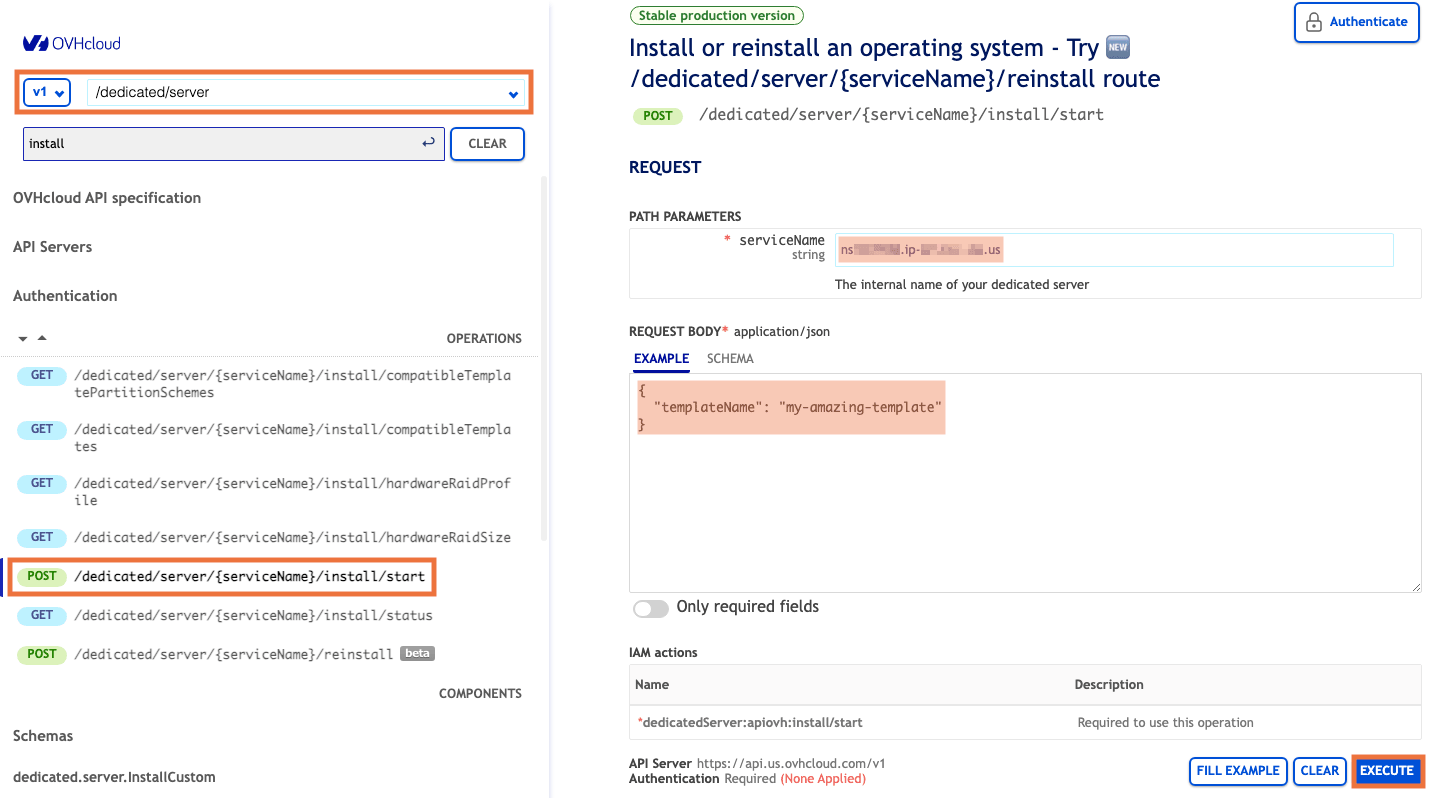
You can go back to the OVHcloud Control Panel on the dedicated server dashboard page to track the installation progress.
Using OVHcloud APIs
If you are using the OVHcloud APIs to trigger OS installations from a personal template, you can continue using the POST /dedicated/server/{serviceName}/install/start API call until the 7th of October 2025.
But please note that starting from the 17th of June 2025, you will no longer be able to add or edit personal templates.
Although you will receive an email with all the details to migrate your API payloads to the new "/reinstall" API call, feel free to start exploring the examples and schemes of the new /reinstall API call in the API console and look at its public documentation.
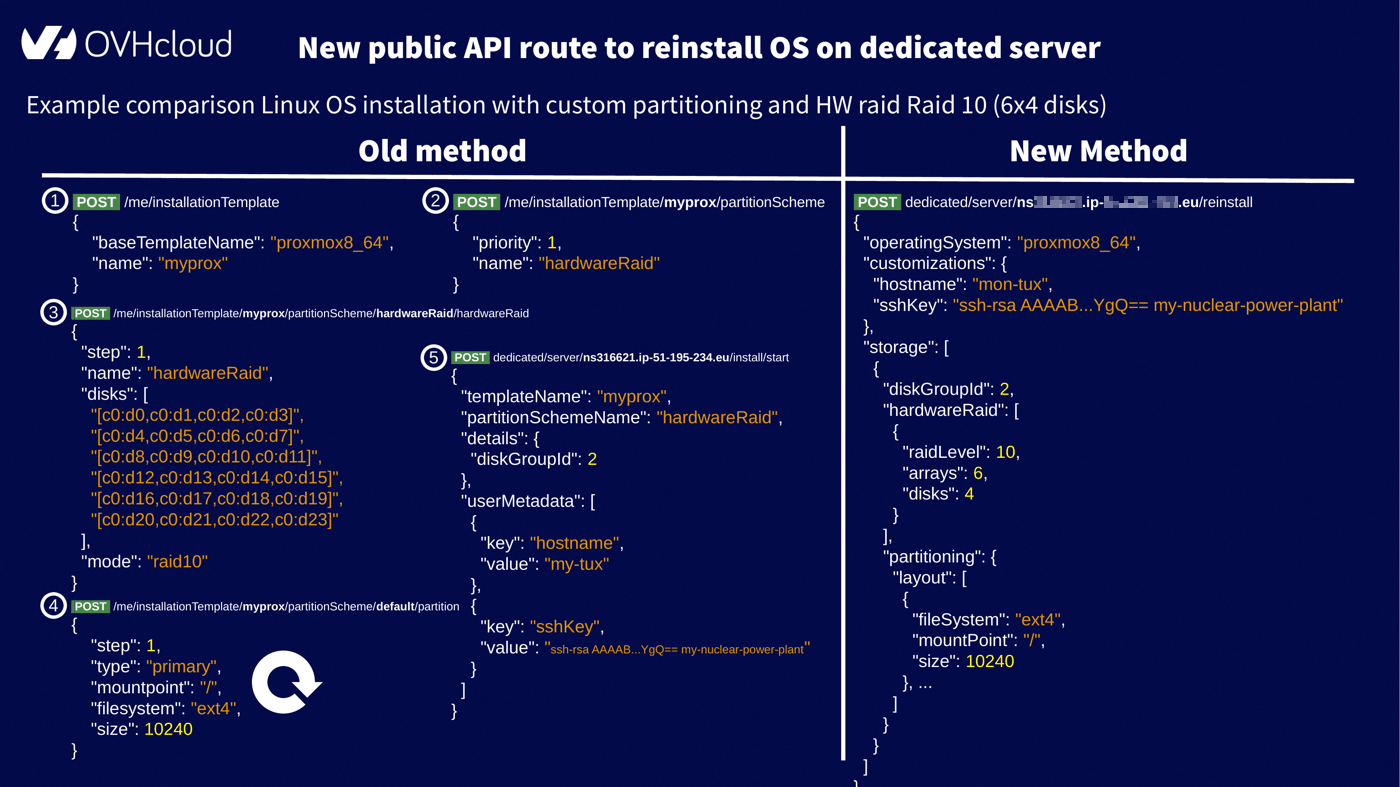
The end of the personal templates feature will simplify OS installation on dedicated servers. Indeed, the new API call
brings all the possible customizations that the old API callwas not able to offer without the need to first define a personal template under /me/installationTemplate.The following comparison gives you an idea of the reduced number of API calls to achieve a complex customization configuration involving hardware RAID and custom partitioning: from 4+n calls (where n is the number of partitions you have defined in your partitioning layout) to a single API call.
As you can see, everything becomes streamlined, eliminating the need for heavy setup.
Go further
Getting started with a dedicated server
Getting started with a Kimsufi, So You Start or Rise dedicated server
First steps with the OVHcloud APIs
OVHcloud API & OS installation
Browse all the Dedicated Servers guides.
Browse the rest of the OVHcloud US documentation for guides on our other products and services.
Learn more about Dedicated Servers on the OVHcloud US website.