
How to order a VPS
Learn how to order a VPS through the OVHcloud Control Panel or the OVHcloud API.
Requirements
- An OVHcloud account
- A default payment method set on your account
- Access to the OVHcloud Control Panel or OVHcloud API
Info
To see our full range of VPS options, see our pricing comparison page.
Instructions
Tip
✔ Select a method to create your VPS order.
From the OVHcloud Control Panel, select Bare Metal Cloud, Order, and VPS.
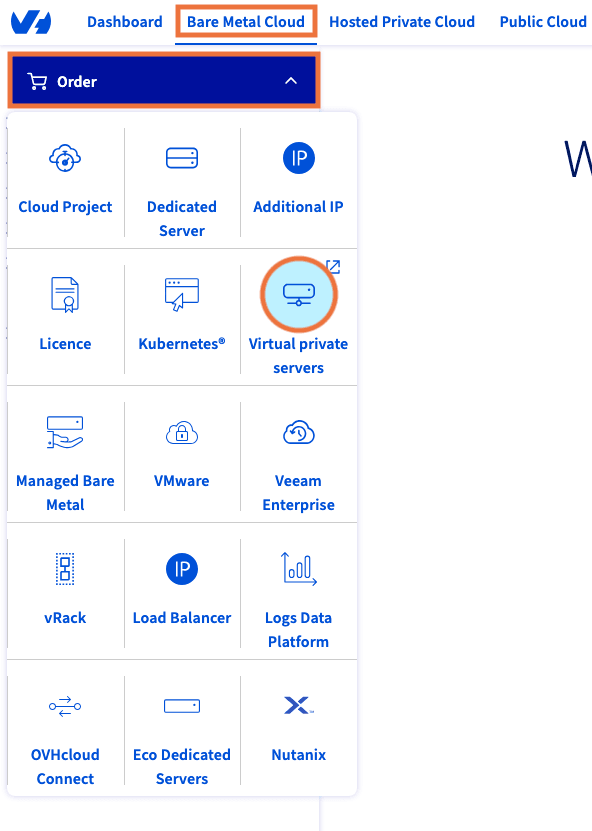
You will be redirected to an order funnel where you will:
- configure your VPS
- choose an image
- select data centers and quantities
- choose whether to add on features, such as snapshot backup or additional storage
- select your renewal frequency
- review your order
- confirm your address
- confirm your payment method
- review our Terms of Service
When you have made all of your selections and confirmed your information, click Continue →.
Go further
Browse all the Virtual Private Servers guides.
Browse the rest of the OVHcloud US documentation for guides on our other products and services.
Learn more about VPS on the OVHcloud US website.