
How to order a Dedicated Server
Learn how to order a Dedicated Server through the OVHcloud Control Panel or the OVHcloud API.
Requirements
- An OVHcloud account
- A default payment method set on your account
- Access to the OVHcloud Control Panel or OVHcloud API
To see our full range of Dedicated Server options, see our pricing comparison page.
Instructions
✔ Select a method to create your server order.
From the OVHcloud Control Panel, select Bare Metal Cloud, Dedicated servers, and Order a dedicated server.
Alternatively, you can click the + Add a service button.
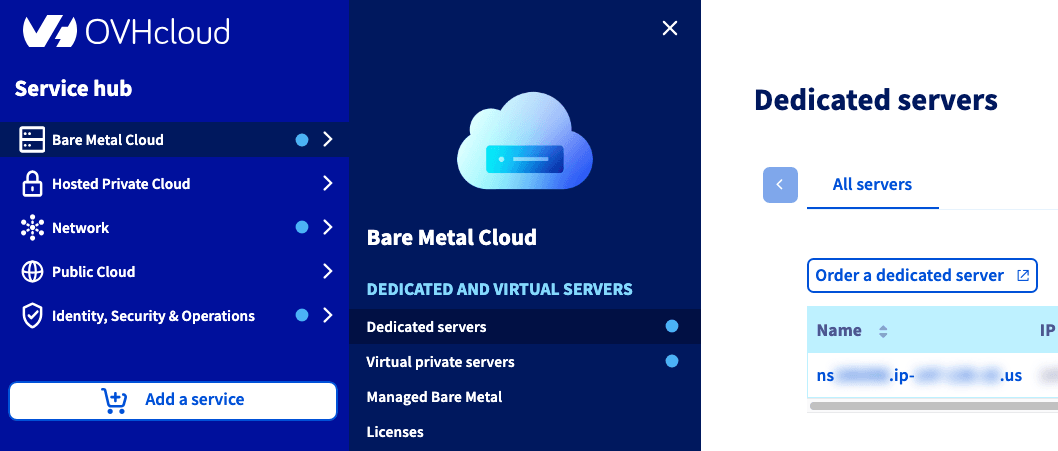
You will be redirected to an order funnel where you will:
- choose your server
- configure your options
- select data centers and quantities
- your commitment duration
- review your order and click
Checkout → - confirm your address
- confirm your payment method
- review our Terms of Service
When you have made all of your selections and confirmed your information, click Continue →.
Create a cart
You must specify "US" for the ovhSubsidiary parameter.
{
  "ovhSubsidiary": "US"
}
Assign the cart to your account
Choose a plan
Save your chosen planCode, duration, and pricingMode from the response.
Example:
"planCode": "24rise01-us"
"duration": "P1M"
"pricingMode": "default"
Add the server to your cart
Save the itemId from the response.
Example:
"itemId": 12345678
Configure the server
You must specify a data center, an operating system, and a region. Each configuration will require a separate submission through the API.
Example:
{
  "label": "dedicated_datacenter",
  "value": "hil"
}
{
"label": "dedicated_os",
"value": "none_64.en"
}{
"label": "region",
"value": "united_states"
}
Check available options for your server
Apply options to your server
Read the Terms of Service and verify your cart
Submit your order
Set the autoPayWithPreferredPaymentMethod parameter to "true" to use your default payment method.
{
  "autoPayWithPreferredPaymentMethod": true,
  "waiveRetractationPeriod": false
}NOTE: This following Terraform example is provided as proof-of-concept, demonstrating how bare metal ordering can be automated. Please note that OVHcloud support does not provide assistance with Terraform usage, debugging, or troubleshooting, as these activities fall outside the scope of our support. Additionally, plan codes used in these examples are subject to change over time and may require adjustments by the user. For details on customer and provider responsibilities, please refer to Dedicated Servers - Responsibility sharing.
For more information about the data sources used in this example, see our Using Terraform with OVHcloud guide.
Create and configure your order
terraform {
  required_providers {
    ovh = {
      source  = "ovh/ovh"
      version = "~ 1.0"  # Specify the version you want to use
    }
  }
}

provider "ovh" {
  application_key    = "xxx"
  application_secret = "xxx"
  consumer_key       = "xxx"
  endpoint           = "ovh-us"
}

data "ovh_me" "account" {}

resource "ovh_dedicated_server" "server1" {
  ovh_subsidiary = data.ovh_me.account.ovh_subsidiary
  display_name = "TFE Made me a Server"
  os = "debian12_64"
  plan = [
    {
      plan_code = "24rise012-us"
      duration = "P1M"
      pricing_mode = "default"

      configuration = [
        {
          label = "dedicated_datacenter"
          value = "hil"
        },
        {
          label = "dedicated_os"
          value = "none_64.en"
        },
        {
          label = "region"
          value = "us"
        }
      ]
    }
  ]
}

resource "ovh_dedicated_server" "client1" {
  ovh_subsidiary = data.ovh_me.account.ovh_subsidiary
  display_name = "TFE Made me a Client"
  os = "debian12_64"
  plan = [
    {
      plan_code = "24rise012-us"
      duration = "P1M"
      pricing_mode = "default"

      configuration = [
        {
          label = "dedicated_datacenter"
          value = "hil"
        },
        {
          label = "dedicated_os"
          value = "none_64.en"
        },
        {
          label = "region"
          value = "us"
        }
      ]
    }
  ]
}
Review your order
user@host:~/BMTerraform$ terraform plan
data.ovh_me.account: Reading...
data.ovh_me.account: Read complete after 0s [id=user@domain.com]

Terraform used the selected providers to generate the following execution plan. Resource actions are indicated with the
following symbols:
  + create

Terraform will perform the following actions:

  # ovh_dedicated_server.client1 will be created
  + resource "ovh_dedicated_server" "client1" {
      + availability_zone   = (known after apply)
      + boot_id             = (known after apply)
      + boot_script         = (known after apply)
      + commercial_range    = (known after apply)
      + datacenter          = (known after apply)
      + display_name        = "TFE Made me a Client"
      + efi_bootloader_path = (known after apply)
      + iam                 = (known after apply)
      + ip                  = (known after apply)
      + link_speed          = (known after apply)
      + monitoring          = (known after apply)
      + name                = (known after apply)
      + new_upgrade_system  = (known after apply)
      + no_intervention     = (known after apply)
      + order               = (known after apply)
      + os                  = "debian12_64"
      + ovh_subsidiary      = "US"
      + plan                = [
          + {
              + configuration = [
                  + {
                      + label = "dedicated_datacenter"
                      + value = "hil"
                    },
                  + {
                      + label = "dedicated_os"
                      + value = "none_64.en"
                    },
                  + {
                      + label = "region"
                      + value = "us"
                    },
                ]
              + duration      = "P1M"
              + plan_code     = "24rise012-us"
              + pricing_mode  = "default"
            },
        ]
      + power_state         = (known after apply)
      + professional_use    = (known after apply)
      + rack                = (known after apply)
      + region              = (known after apply)
      + reverse             = (known after apply)
      + root_device         = (known after apply)
      + server_id           = (known after apply)
      + service_name        = (known after apply)
      + state               = (known after apply)
      + support_level       = (known after apply)
    }

  # ovh_dedicated_server.server1 will be created
  + resource "ovh_dedicated_server" "server1" {
      + availability_zone   = (known after apply)
      + boot_id             = (known after apply)
      + boot_script         = (known after apply)
      + commercial_range    = (known after apply)
      + datacenter          = (known after apply)
      + display_name        = "TFE Made me a Server"
      + efi_bootloader_path = (known after apply)
      + iam                 = (known after apply)
      + ip                  = (known after apply)
      + link_speed          = (known after apply)
      + monitoring          = (known after apply)
      + name                = (known after apply)
      + new_upgrade_system  = (known after apply)
      + no_intervention     = (known after apply)
      + order               = (known after apply)
      + os                  = "debian12_64"
      + ovh_subsidiary      = "US"
      + plan                = [
          + {
              + configuration = [
                  + {
                      + label = "dedicated_datacenter"
                      + value = "hil"
                    },
                  + {
                      + label = "dedicated_os"
                      + value = "none_64.en"
                    },
                  + {
                      + label = "region"
                      + value = "us"
                    },
                ]
              + duration      = "P1M"
              + plan_code     = "24rise012-us"
              + pricing_mode  = "default"
            },
        ]
      + power_state         = (known after apply)
      + professional_use    = (known after apply)
      + rack                = (known after apply)
      + region              = (known after apply)
      + reverse             = (known after apply)
      + root_device         = (known after apply)
      + server_id           = (known after apply)
      + service_name        = (known after apply)
      + state               = (known after apply)
      + support_level       = (known after apply)
    }

Plan: 2 to add, 0 to change, 0 to destroy.
Apply your order
user@host:~/BMTerraform$ terraform apply
data.ovh_me.account: Reading...
data.ovh_me.account: Read complete after 0s [id=user@domain.com]

Terraform used the selected providers to generate the following execution plan. Resource actions are indicated with the
following symbols:
  + create

Terraform will perform the following actions:

  # ovh_dedicated_server.client1 will be created
  + resource "ovh_dedicated_server" "client1" {
      + availability_zone   = (known after apply)
      + boot_id             = (known after apply)
      + boot_script         = (known after apply)
      + commercial_range    = (known after apply)
      + datacenter          = (known after apply)
      + display_name        = "TFE Made me a Client"
      + efi_bootloader_path = (known after apply)
      + iam                 = (known after apply)
      + ip                  = (known after apply)
      + link_speed          = (known after apply)
      + monitoring          = (known after apply)
      + name                = (known after apply)
      + new_upgrade_system  = (known after apply)
      + no_intervention     = (known after apply)
      + order               = (known after apply)
      + os                  = "debian12_64"
      + ovh_subsidiary      = "US"
      + plan                = [
          + {
              + configuration = [
                  + {
                      + label = "dedicated_datacenter"
                      + value = "hil"
                    },
                  + {
                      + label = "dedicated_os"
                      + value = "none_64.en"
                    },
                  + {
                      + label = "region"
                      + value = "us"
                    },
                ]
              + duration      = "P1M"
              + plan_code     = "24rise012-us"
              + pricing_mode  = "default"
            },
        ]
      + power_state         = (known after apply)
      + professional_use    = (known after apply)
      + rack                = (known after apply)
      + region              = (known after apply)
      + reverse             = (known after apply)
      + root_device         = (known after apply)
      + server_id           = (known after apply)
      + service_name        = (known after apply)
      + state               = (known after apply)
      + support_level       = (known after apply)
    }

  # ovh_dedicated_server.server1 will be created
  + resource "ovh_dedicated_server" "server1" {
      + availability_zone   = (known after apply)
      + boot_id             = (known after apply)
      + boot_script         = (known after apply)
      + commercial_range    = (known after apply)
      + datacenter          = (known after apply)
      + display_name        = "TFE Made me a Server"
      + efi_bootloader_path = (known after apply)
      + iam                 = (known after apply)
      + ip                  = (known after apply)
      + link_speed          = (known after apply)
      + monitoring          = (known after apply)
      + name                = (known after apply)
      + new_upgrade_system  = (known after apply)
      + no_intervention     = (known after apply)
      + order               = (known after apply)
      + os                  = "debian12_64"
      + ovh_subsidiary      = "US"
      + plan                = [
          + {
              + configuration = [
                  + {
                      + label = "dedicated_datacenter"
                      + value = "hil"
                    },
                  + {
                      + label = "dedicated_os"
                      + value = "none_64.en"
                    },
                  + {
                      + label = "region"
                      + value = "us"
                    },
                ]
              + duration      = "P1M"
              + plan_code     = "24rise012-us"
              + pricing_mode  = "default"
            },
        ]
      + power_state         = (known after apply)
      + professional_use    = (known after apply)
      + rack                = (known after apply)
      + region              = (known after apply)
      + reverse             = (known after apply)
      + root_device         = (known after apply)
      + server_id           = (known after apply)
      + service_name        = (known after apply)
      + state               = (known after apply)
      + support_level       = (known after apply)
    }

Plan: 2 to add, 0 to change, 0 to destroy.

Do you want to perform these actions?
  Terraform will perform the actions described above.
  Only 'yes' will be accepted to approve.

  Enter a value: yes

ovh_dedicated_server.server1: Creating...
ovh_dedicated_server.client1: Creating...
ovh_dedicated_server.client1: Still creating... [00m10s elapsed]
ovh_dedicated_server.server1: Still creating... [00m10s elapsed]
ovh_dedicated_server.server1: Still creating... [00m20s elapsed]
ovh_dedicated_server.client1: Still creating... [00m20s elapsed]
ovh_dedicated_server.client1: Still creating... [00m29s elapsed]
ovh_dedicated_server.server1: Still creating... [00m29s elapsed]
ovh_dedicated_server.server1: Still creating... [00m39s elapsed]
Go further
Browse all the Dedicated Servers guides.
Browse the rest of the OVHcloud US documentation for guides on our other products and services.
Learn more about Dedicated Servers on the OVHcloud US website.