
AI Training - Billing and lifecycle
The OVHcloud AI Training service provides you with a service platform, linked to CPU or GPU resources, without the hassle of installing or operating them.
Introduction
AI Training jobs are linked to a Public Cloud project. The whole project is billed at the end of the month, with pay-as-you-go. It means you will only pay for what you consume, based on the compute resources you use (CPUs and GPUs) and their running time.
AI Training job lifecycle
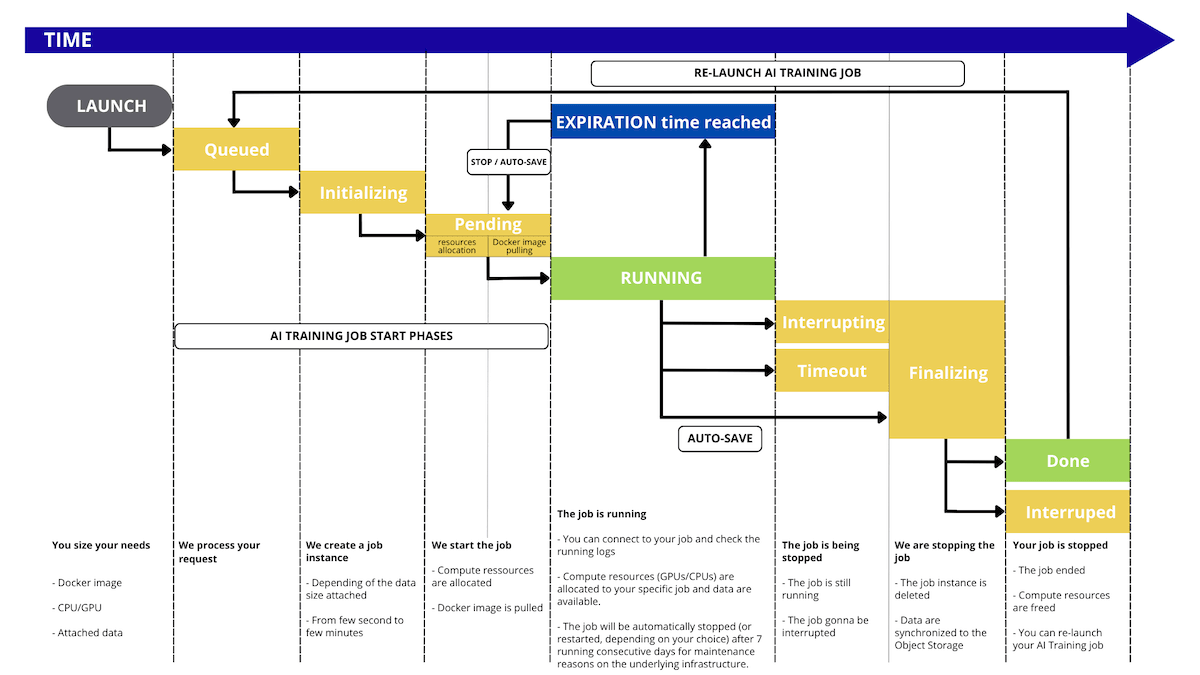
NOTE: By default, your AI Training job will automatically shut down after 7 consecutive days of being in RUNNING status. You can also enable Automatic Restart to have it restart every 7 days.
During its lifetime, the AI Training job will go through the following statuses:
QUEUED: The job run request is about to be processed.INITIALIZING: The job instance is created, and the data is synchronized from the Object Storage. To know more about the data synchronization, check out the Data - Concept and best practices section.PENDING: First, the system allocates the necessary compute resources (CPU/GPU) for the job. Then, the specified Docker image is pulled for use in the job.RUNNING: The job is running; you can connect to it. Compute resources (GPUs/CPUs) are allocated to your specific job, and data are available.INTERRUPTING: The job is still running, but an interruption order was received and is about to be processed.FINALIZING: The job instance is deleted, and the data is synchronized back to the Object Storage.DONE: The job ended normally.TIMEOUT: The job is still running but is about to be interrupted because the timeout was reached.INTERRUPTED: The job has ended and was interrupted.FAILED: The job ended with an error, e.g., the process in the job finished with a non-zero exit code, or the Docker image could not be pulled. For more information, refer to this section of our Troubleshooting documentation.ERROR: The job ended due to a backend error. You may contact our support.
Billing principles
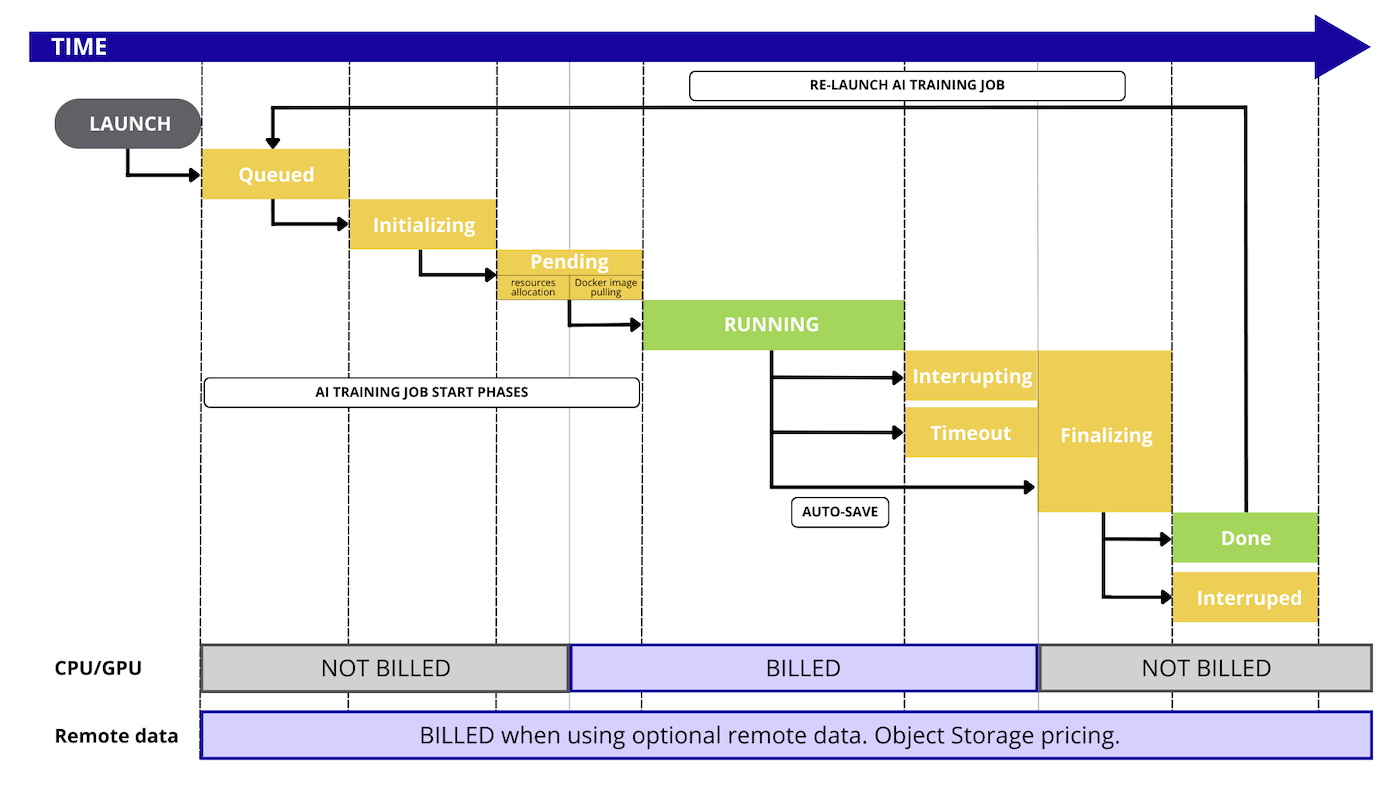
AI Training is a pay-per-use solution. You only pay for resource consumption during the PENDING and RUNNING phases of your jobs.
The billing principle is quite simple: you select the amount of compute resource (CPUs or GPUs) you would like to work with and pay only for this.
Included in AI Training resources:
- AI Training managed service
- Dedicated CPU/GPU compute resources (based on the selected amount)
- Ephemeral local storage (size depends on the selected compute resources)
- Ingress/Egress network traffic
Optional with AI Training:
- Remote storage space, based on OVHcloud Object Storage pricing
- Egress traffic for remote Object storage
Here is a detailed graph that illustrates every step that is billed or not during the AI Training workflow:
Compute resources details
During the AI Training job creation, you can select compute resources, known as CPUs or GPUs. Their official pricing is available in the OVHcloud Control Panel or on the OVHcloud Public Cloud website.
Compute rates are listed per hour for easier reading, but billing remains per minute with per-second granularity.
Storage details
Ephemeral local storage
Each compute resource (CPU or GPU) comes with local storage that we can consider ephemeral since this storage space is not saved when you delete an AI Training job.
The sizing depends on the selected amount of compute resources; check the details on the OVHcloud Public Cloud website.
Remote Object storage
When working with remote data, you pay separately for the storage of this data. The pricing of Object Storage is separate from the AI Training pricing.
Pricing examples
Example 1: one GPU notebook for 45 minutes, then deleted
We start one AI Notebook with two GPUs, and we keep it running for 45 minutes, then we delete it.
- compute resources: 1 x GPU NVIDIA L4 ($0.91 / hour)
- remote storage: none
- duration: 45 minutes
Compute cost: 0.75 (hours) x 1 (GPU) x $0.91 (price / GPU) = $0.6825
Storage cost: none
Total: $0.6825, billed at the end of the month
Example 2: One CPU job for 10 days
We start one AI Training job with two CPUs, and we keep it running for 10 days, then it is stopped.
- compute resources: 2 x CPU ($0.04 / hour)
- remote storage: none
- duration: 10 days, then stopped
Compute cost: 10 (days) x 24 (hours) x 2 (CPU) x $0.04 (price / CPU) = $19.20
Storage cost: none
Total: $19.20, billed at the end of the month
Example 3: One GPU job for 5 hours
We start one AI Training job with two GPUs, and we keep it running for 5 hours, then it is stopped.
- compute resources: 2 x GPU NVIDIA L4 ($0.91 / hour)
- remote storage: none
- duration: 5 hours, then stopped
Compute cost: 5 (hours) x 2 (GPU) x $0.91 (price / GPU) = $9.10
Storage cost: none
Total: $9.10, billed at the end of the month
Go further
Browse all the AI & Machine Learning guides.
Browse the rest of the OVHcloud US documentation for guides on our other products and services.
Learn more about AI & Machine Learning on the OVHcloud US website.
If you need training or technical assistance to implement our solutions, contact your sales representative or click on this link to get a quote and ask our Professional Services experts for a custom analysis of your project.