
Object Storage – Use Object Storage with Pure Storage Flashblade
Learn how you can easily configure, manage, and start replicating Pure Storage FlashBlade S3™*-compatible objects to OVHcloud Object Storage.
This guide aims to help you configure and use OVHcloud Object Storage as a replication target for Pure Storage Flashblade unified storage platform.
Requirements
- An OVHcloud Object Storage container/bucket (get started with this guide)
- Access to the OVHcloud Control Panel
- A user with the required access rights on the bucket
- Your Object Storage credentials (
access_keyandsecret_access_key)
Instructions
Create an S3-compatible Target Connection
-
Sign in to the PureStorage FlashBlade GUI.
-
Go to the
Storagesection and thenArray. -
Click the
+button next toS3 Target Connectionsto create a Target Connections cloud object storage. -
Name the connection (for example,
OVHCLOUD_OBJECT_STORAGE) and add the associated OVHcloud Object Storage endpoints in theAddressfield.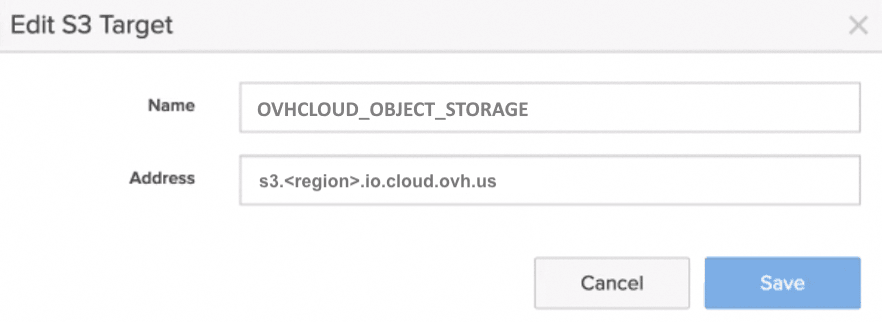
The list of all OVHcloud Object Storage endpoints can be found here.
Add Remote Cloud Object Storage Credentials
-
Go to the
Protectionsection and then click onObject Replica Links. -
Click the
+button to add remote credentials for object replication. -
Select
OVHCLOUD_OBJECT_STORAGEfor Remote Array. -
Add the name of your connection (for example,
OVHcloud_credentials), and add your Access and Secret keys from the OVHcloud Control Panel. -
Confirm by clicking on
Create, and your remote credentials will be created.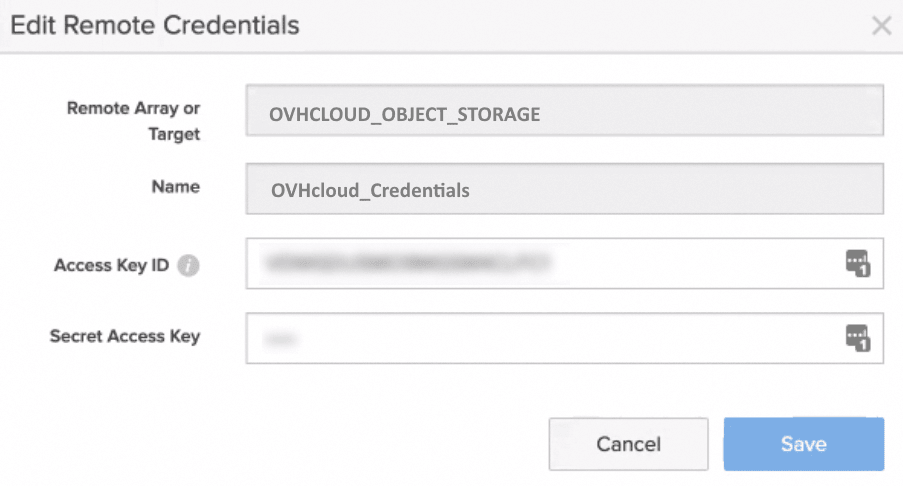
Create a bucket that will be replicated to OVHcloud Object Storage
- If not already done, go to the
Storagesection, thenObject Storage, and finallyAccountsto create the account. - Configure the different parameters:
account name,quota limit, andbucket default quota limitto create the account. - Click the
Bucketssection and select the account name. - Enter a bucket name
OVHcloud-source-2025and click onCreate.
Set up the Bucket Replication to OVHcloud Object Storage
-
Go to
Protection>Object ReplicationandBucket Replication Link. -
Click the
+button to create a bucket replica link. -
Select the bucket you just created.
-
Select
OVHCLOUD_OBJECT_STORAGEfor Remote Array. -
Add the name of your OVHcloud Object Storage bucket:
OVHcloud-dest-2025. -
Add your remote credentials:
OVHcloud_credentials. The bucket replica link will be created.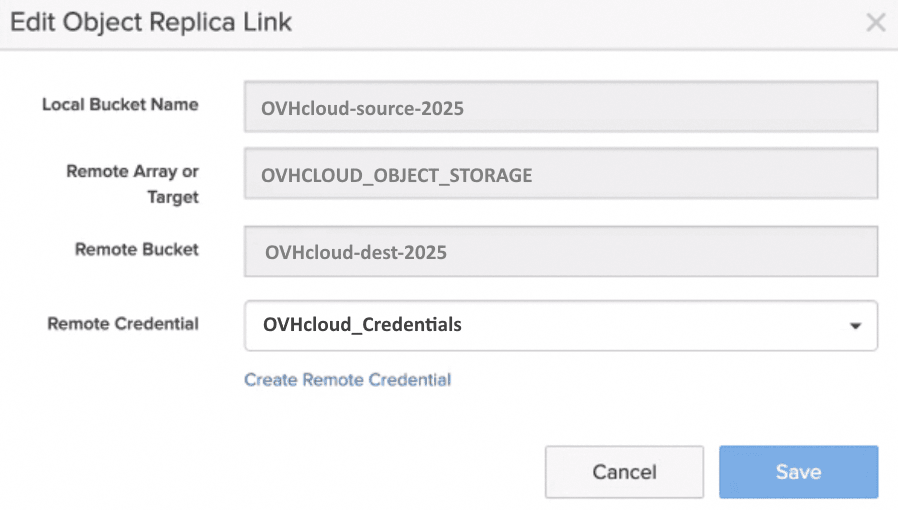
-
You can now test and validate the bucket replication from Pure Storage Flashblade platform to OVHcloud Object Storage.
Go further
Browse all the Object Storage (S3™-compatible) guides.
Browse the rest of the OVHcloud US documentation for guides on our other products and services.
Learn more about Object Storage on the OVHcloud US website.
*S3 is a trademark filed by Amazon Technologies, Inc. OVHcloud's service is not sponsored by, endorsed by, or otherwise affiliated with Amazon Technologies, Inc.