
How to Isolate Management Machines from Production
This guide explains how to isolate management machines to improve security.
A Nutanix cluster contains two different types of management machines after delivery:
- VM, 1 CVM per node plus Prism Central
- Physical servers (nodes)
To increase the security of management machines, it is recommended to isolate them from the production environment.
Requirements
- A Nutanix cluster in your OVHcloud account
Instructions
Step 1
Connect to the Prism Central Web interface.
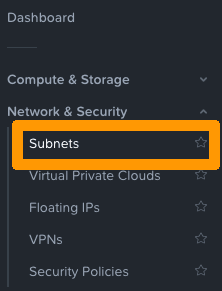
Go to Network & Security and open Subnets.
Step 2
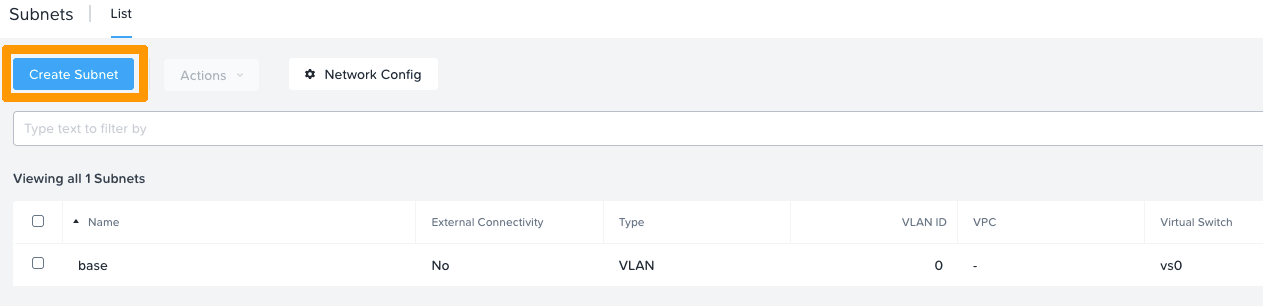
In this example, VLAN 0 is associated with the "base" subnet on the "vs0" virtual switch.
To isolate the management network, you can use a new subnet in VLAN 1 for example.
To do this, click on Create Subnet.
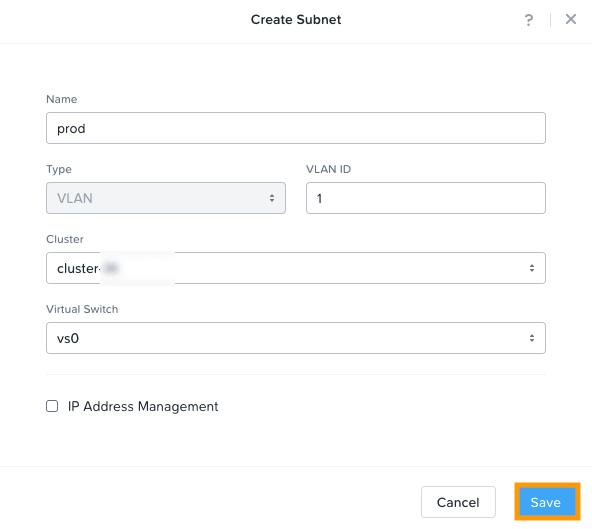
Enter a name for your network, then select a VLAN ID, cluster, and the "vs0" virtual switch.
Then click Save.
Go further
Browse all the Nutanix guides.
Browse the rest of the OVHcloud US documentation for guides on our other products and services.
Learn more about Nutanix on OVHcloud on the OVHcloud US website.